Browse recorded workouts
Lists recent HealthKit workouts on iPhone with activity type, date, duration, and distance — from 40+ activity types including running, cycling, and swimming.
Export Apple Health and Apple Watch workouts as GPX, TCX, CSV, JSON, and PDF. Analyze, archive, migrate, or share your workout history — without subscriptions or cloud services.
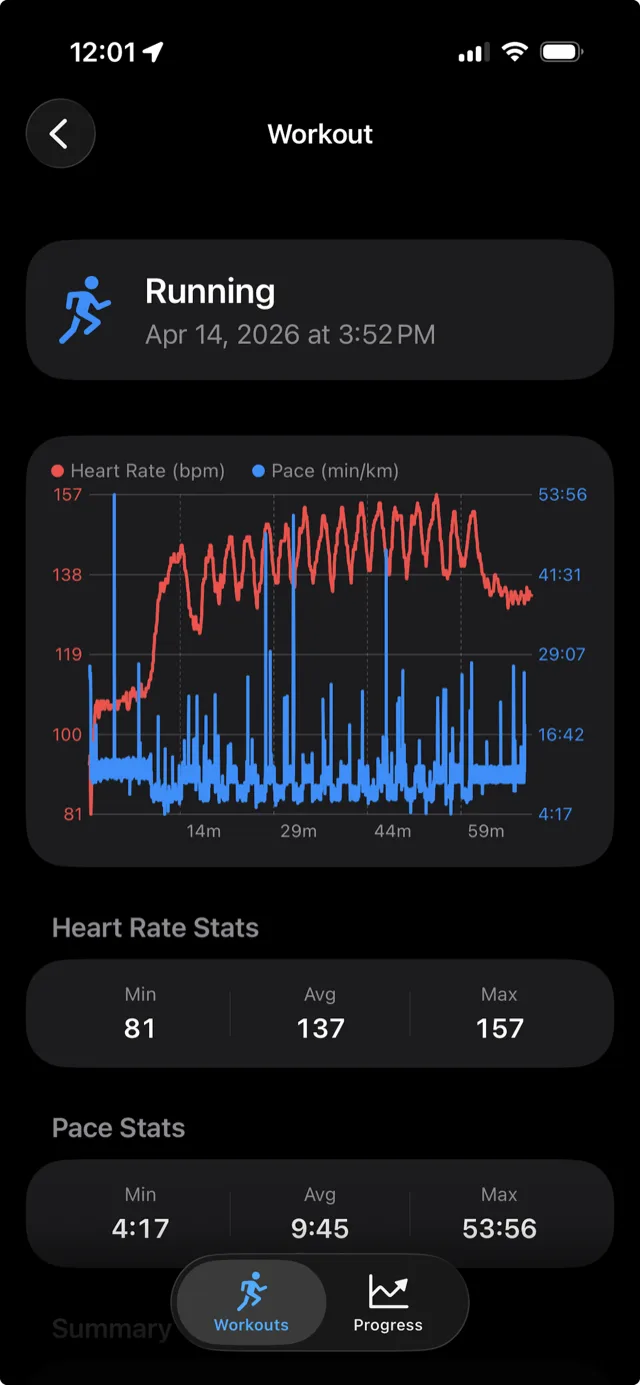
Browse your workouts, analyze them with coach-grade metrics, and export clean, usable files — including AI-ready summaries and PDF reports.
Lists recent HealthKit workouts on iPhone with activity type, date, duration, and distance — from 40+ activity types including running, cycling, and swimming.
Heart-rate zones, cardiac drift, splits, percentiles, target-band occupancy, behavioral segments, and signal quality — computed on device.
JSON, GPX, TCX, two CSV layouts, a single-page PDF report, plus AI Training Summary and AI Model JSON for large language models.
Package a session into Markdown or compact JSON built for ChatGPT and Claude, so you can ask an LLM to review a workout like a coach.
Visualize duration, distance, average speed, and energy trends per workout type. Filter by preset periods or a custom date range.
Generate single-page PDF reports for an individual workout or a whole training period — with route map, charts, and stats.
Pick the format for what you do next — analysis, platform import, archiving, a printable report, or AI coaching.
Lossless HealthKit dump — metadata, route points, events, and per-type samples. Best for Python, notebooks, and archiving.
GPX 1.1 with heart-rate track extensions. Loads into mapping tools and most fitness platforms.
Structured workout with route, HR, power, and cadence. Imports into Strava, Garmin Connect, TrainingPeaks, and Golden Cheetah.
Workout metadata, coverage, and per-sample-type statistics in a tidy four-column layout for spreadsheets.
All raw time-series samples — heart rate, pace, power, cadence, altitude — flattened to rows for custom analysis.
A single-page printable report with route map, summary cards, metric charts (with HR median & P90), and a sample stats table.
Dense, human-readable analysis built to paste into ChatGPT or Claude for coaching feedback on a session.
A compact, schema-versioned JSON with a piecewise HR curve and structured metrics — purpose-built for LLM APIs.

Every analytic is computed locally from your HealthKit samples and folded into the AI and PDF exports.
Three models — percent-max HR, Karvonen (with resting HR), and Friel (with lactate threshold). Time and percentage per zone.
Time-weighted p25, p50 (median), p75, p90, and p95 for a true distribution, not just min/avg/max.
First-half vs second-half HR, and pace-to-HR decoupling when pace is available — the classic aerobic durability check.
Per kilometer or mile, with pace normalized to /km plus optional per-split heart rate and elevation gain/loss.
Time in, above, and below your prescribed HR band — with excursion episode counts and longest streaks.
Heart-rate coverage percentage, dropout count, and longest gap, so you know how much to trust the numbers.
Automatic warmup, steady, surge, recovery-walk, and cooldown labeling for runs and walks.
How well heart rate recovers during walk breaks — start-vs-end HR per recovery segment.
Plain-language, rule-based callouts on drift, occupancy, recovery, and ceiling violations against your intent.
Two exports turn a workout into something a large language model can reason about. Generated on device — you decide where they go.
# AI Training Summary — Running — Apr 14
## Context
- Activity: Running (outdoor)
- Duration: 1:15:11 · Distance: 6.16 km
- Goal: Aerobic Base · Target band: 130–150
## Heart Rate
- Avg 137 · Max 157 · Median 138
- p90 151 · Coverage 99.4%
## HR Zones (% max)
- Z2 41% · Z3 38% · Z4 16%
## Cardiac Drift
- PA:HR decoupling 4.8%
## Assessment
- Aerobic base session; drift in range
{
  "schema_version": "workout-ai-model-v1",
  "context": {
    "activity_type": "Running",
    "duration_seconds": 4511,
    "goal": "aerobic_base"
  },
  "raw_summary": {
    "avg_hr": 137, "max_hr": 157,
    "percentiles": { "p50": 138, "p90": 151 }
  },
  "signal_quality": {
    "hr_coverage_percent": 99.4,
    "dropout_count": 0
  },
  "heart_rate_curve": {
    "type": "piecewise_linear",
    "point_count": 42,
    "sample_count": 901
  }
}
Representative output. Exports are generated locally and never sent to any AI service by the app — you choose whether to share them.
See training trends per workout type in the app, then export a polished single-page PDF for any period.


Browse workouts, inspect interactive charts and routes, then export or share in a tap.


The only required setup is Health access. Once authorized, the app reads your workouts locally and prepares exports through the standard iOS share sheet.
Launch Workout Exporter on your iPhone. It requests read-only Health access on first use.
Enable workout and sample access in the iOS Health permission sheet so the app can load your sessions.
Choose a session, review the summary and charts, then open the export menu and pick from eight formats.
Use AirDrop, Save to Files, Mail, or paste an AI summary into ChatGPT or Claude.
Exports reflect exactly what HealthKit recorded for each session.
Running, walking, hiking, cycling, swimming, rowing, elliptical, strength, HIIT, yoga, and dozens of sports. Aerobic activities get the full analytics stack.
Heart rate, distance, active/basal energy, running & cycling power, speed, cadence, stride length, vertical oscillation, ground contact time, swimming strokes, and route (GPS).
Set max HR, resting HR, and lactate threshold for accurate zones; choose km or miles; add custom HR thresholds; capture per-export goal and target band.
Most issues come down to Health permissions, the iOS environment, or a workout that has no route or associated samples.
Confirm read access in Settings > Health > Data Access & Devices, and that the workouts exist in Apple Health on that iPhone.
Some workout types have no GPS data. Indoor strength, yoga, and stationary sessions export without route points, which is expected.
Zones need a max HR set in Settings; drift and splits need pace or distance; signal quality flags low HR coverage so you know why.
HealthKit workout queries are not useful in the iOS Simulator. Use a physical iPhone with real Health data.
Scroll the share sheet, check AirDrop is enabled, or save the export to Files and move it from there.
Not every workout records every metric. The export reflects what HealthKit has, so some sample groups may be empty.
What data is read, where files go, which devices are supported, and how privacy works.
No. It works on device. Data only leaves your phone when you explicitly export and share a file. The AI exports are generated locally too — the app never sends anything to an AI service.
The AI Training Summary (Markdown) and AI Model JSON package a workout into a format built for large language models, so you can ask ChatGPT or Claude to analyze a session like a coach.
No — it is a one-time purchase of $4.99, with no subscription and no in-app purchases.
JSON for analysis and archiving, GPX for routes, TCX for fitness platforms, CSV for spreadsheets, PDF for a printable report, and the AI formats for LLM coaching.
HealthKit records different data by workout type, hardware, and sensors. The exporter only includes what exists for that session.
The privacy story is simple: the app reads workout data to build exports and does not require an online account.
Read access to workouts and the HealthKit samples needed to build exports — route, heart rate, energy, distance, cadence, and power when present.
Only to display workouts and create the export file you request. All processing — including the AI summaries — happens on device. No sign-in; designed to operate offline.
For the full legal version, see the Privacy Policy.